
A TLS Handshake hidden mechanism confused everybody so much and I found out why.
I just spent last week in Tunis, Tunisia 🇹🇳, helping a government organisation understand and troubleshoot a network/connectivity issue for what was described as “a faulty HTTPS connection”. I got to work closely with SSL/TLS (openssl), certificate chains and ultimately, made me understand a bit better the role of certificate authority. But what was quite surprising to me was that I got to learn a piece of magic inside the TLS handshake
I came to write about it in hopes of making it more clear for myself; and hopefully for others too !
The context is that the company that I currently work for, Bluesquare, is focused on data and health technology solutions that help low to middle income countries, carry out their health programs. The project in question, is meant to be implemented across the country and the core application for it is DHIS2, used as a tracker, which means that the staff out there collect, manage and monitor event-based data, that then is uploaded to the server.
The most convenient way for health workers in the field to operate this exercise of collecting and storing data, is by using the official DHIS2 Android app.
Trying to connect to the server resulted in a red certificate invalid warning which stopped anyone from continuing to connect, let alone upload anything.
Effectively, the critical, irreplaceable information collection work which if done timely, has the potential of making a positive impact, has to be partially done by hand
🙃
So we get contacted to help, and I got to give a shout out to my fantastic, very savvy colleague sms, he deduced the issue immediately, and shared what was ultimately the command we all used to check the issue of the status
-> % openssl s_client -connect "${SERVERNAME}:443" -servername "${SERVERNAME}" -showcerts </dev/null 2>/dev/null | grep 'Verify'
    Verify return code: 21 (unable to verify the first certificate)
But of course that wasn’t the root cause. So I did a check to see the certificate chain:
-> % openssl s_client -connect "${SERVERNAME}:443" -servername "${SERVERNAME}" -showcerts </dev/null 2>/dev/null | grep -E '^ *[0-9]+ s:|i:' | sed "s/${SERVERNAME}/***/g"

 0 s:CN=*.***
   i:C=GB, O=Sectigo Limited, CN=Sectigo Public Server Authentication CA DV R36
Aha ! There is only 1, there needs to be 3
Certificate chains: a bit more context about the issue
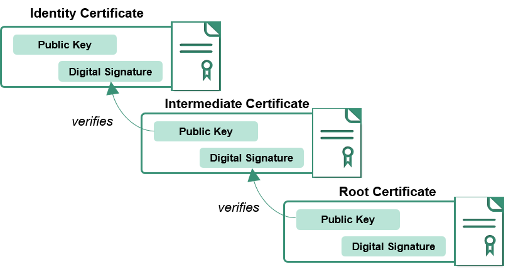
The SSL/TLS handshake authentication step needs to verify the server certificate against the issuer’s intermediate certificate. Which in turn, verifies against the root certificate.
But the intermediate and root certificate is not being sent in the response.
I went and rebuilt by hand the certificate chain. To do this you only need the server certificate.
openssl x509 -in cert.pem -noout -text | grep -A1 "CA Issuers"
# CA Issuers - URI:"<use this>"
Download the intermediate in DER and convert to PEM
curl -fsSL -o intermediate.der "<URI from step before>"
openssl x509 -inform DER -in intermediate.der -out intermediate.pem
Do the same to get the root
openssl x509 -in intermediate.pem -noout -text | grep -A1 "CA Issuers"
# CA Issuers - URI:"<use this>"
curl -fsSL -o root.der "<URI from step before>"
openssl x509 -inform DER -in root.der -out root.pem
Finally, concatenate everything into a single file, let’s call it the fullchain.pem
cat cert.pem intermediate.pem root.pem > fullchain.pem
grep -c "BEGIN CERTIFICATE" fullchain.pem      # has to say 3
You should end with something similar to this.
openssl crl2pkcs7 -nocrl -certfile fullchain.pem | openssl pkcs7 -print_certs -noout

# subject=CN = *.***
# issuer=C = GB, O = Sectigo Limited, CN = Sectigo Public Server Authentication CA DV R36

# subject=C = GB, O = Sectigo Limited, CN = Sectigo Public Server Authentication CA DV R36
# issuer=C = GB, O = Sectigo Limited, CN = Sectigo Public Server Authentication Root R46

# subject=C = GB, O = Sectigo Limited, CN = Sectigo Public Server Authentication Root R46
# issuer=C = US, ST = New Jersey, L = Jersey City, O = The USERTRUST Network, CN = USERTrust RSA Certification Authority
So I SSH’d into the server and replaced the leaf cert for this full chain, and tada 🎉! the problem was solved 😃
Of course I didn’t stop there, I wanted to know more !
But why it was only affecting older Androids, certain clients (
openssl,curl) and this specific Android app. ?
Handshake magic (AIA)
I tried from many different web browsers and iOS devices. Everything worked well, I could see the full certificate hierarchy in the responses from the browser tab, but my openssl/curl commands said otherwise. How come ?
Enter AIA (Authority Information Access).
(AIA) is an X.509 certificate extension that points web browsers and clients to the issuer’s resources to help build a complete chain of trust. Authority Information Access as defined on the RFC 5280 Section 4.2.2.1
This process is present in most modern browsers, but there are strict clients such as Android, java, python, curl, openssl (such as the examples above) where the response is left intact as it comes. More info on AIA here
Once again, one of the most important aspects of the internet, trust, made easy and hidden away.
Anyways, I thought about using a programming language to attempt to replicate AIA Fetching. Here’s the dumbest, simplest in Go
// aia-chain: build a certificate chain from a PEM leaf by following
// AIA caIssuers URLs (RFC 5280 §4.2.2.1).
//
// Usage: go run . leaf.pem > fullchain.pem
package main

import (
	"bytes"
	"crypto/x509"
	"encoding/pem"
	"fmt"
	"io"
	"log"
	"net/http"
	"os"
)

func main() {
	if len(os.Args) != 2 {
		log.Fatal("usage: go run . cert.pem")
	}

	data, err := os.ReadFile(os.Args[1])
	if err != nil {
		log.Fatal(err)
	}
	block, _ := pem.Decode(data)
	if block == nil {
		log.Fatal("no PEM block found")
	}
	cert, err := x509.ParseCertificate(block.Bytes)
	if err != nil {
		log.Fatal(err)
	}

	chain := []*x509.Certificate{cert}
	for len(chain) < 10 && !isSelfSigned(cert) && len(cert.IssuingCertificateURL) > 0 {
		issuer, err := fetch(cert.IssuingCertificateURL[0])
		if err != nil {
			log.Fatal(err)
		}
		if err := cert.CheckSignatureFrom(issuer); err != nil {
			log.Fatalf("fetched cert did not sign %q: %v", cert.Subject, err)
		}
		chain = append(chain, issuer)
		cert = issuer
	}

	for i, c := range chain {
		fmt.Fprintf(os.Stderr, "[%d] %s\n", i, c.Subject)
		pem.Encode(os.Stdout, &pem.Block{Type: "CERTIFICATE", Bytes: c.Raw})
	}
}

// fetch downloads the issuer cert. RFC 5280 says this is DER
// (application/pkix-cert); some CAs serve PEM, so accept both.
func fetch(url string) (*x509.Certificate, error) {
	resp, err := http.Get(url)
	if err != nil {
		return nil, err
	}
	defer resp.Body.Close()

	body, err := io.ReadAll(resp.Body)
	if err != nil {
		return nil, err
	}
	if b, _ := pem.Decode(body); b != nil {
		body = b.Bytes
	}
	return x509.ParseCertificate(body)
}

func isSelfSigned(c *x509.Certificate) bool {
	return bytes.Equal(c.RawIssuer, c.RawSubject)
}
You’ll need go.mod
// go.mod
module aia-chain

go 1.21
Finally the certificate, I used the one in oschvr.com
# leaf.pem
-----BEGIN CERTIFICATE-----
MIIE/TCCA+WgAwIBAgISBt44nI8WXpdlyZ/5so2VibzJMA0GCSqGSIb3DQEBCwUA
MDMxCzAJBgNVBAYTAlVTMRYwFAYDVQQKEw1MZXQncyBFbmNyeXB0MQwwCgYDVQQD
EwNZUjIwHhcNMjYwODIwMTAyMTQwWhcNMjYxMTE4MTAyMTM5WjAVMRMwEQYDVQQD
Ewpvc2NodnIuY29tMIIBIjANBgkqhkiG9w0BAQEFAAOCAQ8AMIIBCgKCAQEAmJhY
6+zLtneB6HAOhyIx79JjY2cBnJBOEBaUnPUZtgUwVraCQWLUMQt5wNThwTYTH1xw
FiHQHFMTjDwMjF0VR/jHlClBj8Ljsim2G3eNqHPq2GORN9ImUGGhBL36diIGpaA9
3AdLj7cGJLYXki7JrtwWLCzDbJQjLZ+d1EDamCY9Z4c3tkyko+5SMeOHLO047nCl
tZh9w4eW+y5FbKJsJP9jQrbkfNRfa5ZzJHoMpYlohvFxA3lTDogcblql8IAMZg2k
oiC1uQkcADWPPImnioxOV/0eKBk6Y9BWA+n1Mg03QD+akHEz19e0fkFItAWqjvdl
NoeHZsr/bYND70isjQIDAQABo4ICJzCCAiMwDgYDVR0PAQH/BAQDAgWgMBMGA1Ud
JQQMMAoGCCsGAQUFBwMBMAwGA1UdEwEB/wQCMAAwHQYDVR0OBBYEFFjJsqpo5qVI
zNgr6EKyv3++RWZoMB8GA1UdIwQYMBaAFEAVLSZ57TIgnt+ach3WMh+BDIEMMDMG
CCsGAQUFBwEBBCcwJTAjBggrBgEFBQcwAoYXaHR0cDovL3lyMi5pLmxlbmNyLm9y
Zy8wJQYDVR0RBB4wHIIKb3NjaHZyLmNvbYIOd3d3Lm9zY2h2ci5jb20wEwYDVR0g
BAwwCjAIBgZngQwBAgEwLgYDVR0fBCcwJTAjoCGgH4YdaHR0cDovL3lyMi5jLmxl
bmNyLm9yZy83NC5jcmwwggELBgorBgEEAdZ5AgQCBIH8BIH5APcAdgCUTkOH+uzB
74HzGSQmqBhlAcfTXzgCAT9yZ31VNy4Z2AAAAaAe5mJ9AAAEAwBHMEUCIHplkCfW
qBWG3VK5o9/ZY8cY299zra9bvElGtmQ3gKjSAiEA2XRtuG+aWizW3+UUQk4F1UyW
DmioafbFVvsjAZONsvoAfQAai51rD/6/gbR5OcbSMQqG1tEC1PBG4hgsneNfXiYl
7wAAAaAe5mP4AAgAAAUANnnjGQQDAEYwRAIgNUubq2FKYjeOl7qUvhMV+oD+FdUr
5EUgAWuxX8ZsAyoCIDEQCRpprq4WuNOxtIxWY7vF5nEjuXbipi1cIX48jq0BMA0G
CSqGSIb3DQEBCwUAA4IBAQBYQrpF8365JcVynD5OoYLtDPFdTUYdF4Psg7fhix6u
Lx12l2SV/4S4ahfYwy0TvrO2WViD05Kt/Vp8WxjXWIt8emRV6zZdKzQF5I88sVmP
s71IRNS+onib08iLwBL/nkGZuDwEZFy6lqT7Nz9CRtMTJhQmLRZbF9Mw/34hJanN
T6V/jllLN6Rg09ydMk3ZfjQiGov/zqk83Jwi6lJLU7Gwu0aWae8NCgLNk6GJFKtA
zoQ8hpIWAOPW6o0wI6yASuFxsz8DtEkxPQM+6tAVJsSk7zNdYTSHEbnGCRYmIJHQ
KW2PRofVqDqmzKZWpn9u50MmhVSlHsSxuTfRB/pmWDni
-----END CERTIFICATE-----
##

openssl crl2pkcs7 -nocrl -certfile leaf.pem | openssl pkcs7 -print_certs -noout
# subject=CN=oschvr.com
# issuer=C=US, O=Let's Encrypt, CN=YR2
So once you see the certificate’s hierarchy is only one. You can go ahead and use the script to simulate AIA fetching
go run . leaf.pem > fullchain.pem
openssl crl2pkcs7 -nocrl -certfile fullchain.pem | openssl pkcs7 -print_certs -noout
# subject=CN=oschvr.com
# issuer=C=US, O=Let's Encrypt, CN=YR2
#
# subject=C=US, O=Let's Encrypt, CN=YR2
# issuer=C=US, O=ISRG, CN=Root YR
#
# subject=C=US, O=ISRG, CN=Root YR
# issuer=C=US, O=Internet Security Research Group, CN=ISRG Root X1
#
# subject=C=US, O=Internet Security Research Group, CN=ISRG Root X1
# issuer=C=US, O=Internet Security Research Group, CN=ISRG Root X1
Voila, chain complete !