NOTE: I know the cover image has nothing to do with this post, I just found it in my photos and thought it was pretty
One thing I wanted to document somewhere is a finding I just while I was working on a project.
I’ve been building a Kubernetes cluster using AWS EKS (Elastic Kubernetes Service), with the fantastic terraform-aws-modules
Here’s the example I’m using (trimmed for brevity)
module "eks" {
    source  = "terraform-aws-modules/eks/aws"
    version = "~> 21.0"
    kubernetes_version = "1.34"

    ...
    addons = {
        vpc-cni = {
            before_compute = true
        }
    }
    ...
}
Problem
I am deploying things but Pods get stuck in Pending with the note “Too many pods 0/N nodes are available”. I checked and have sufficient memory and cpu resources to allocate them.
Context
I won’t get into details but essentially if you want to leverage AWS Loadbalancers from Kubernetes to allow either your Ingress or Gateway controllers to provision the infrastructure and talk to AWS
You will need:
- the load balancer controller itself: aws-load-balancer-controller
- the permissions settups so Kubernetes can talk to AWS: iam setup
- Very important: The AWS VPC Container Network Interface for AWS EKS as an EKS addon: aws eks vpc cni addon
Without the last one, your Ingress/Gateway can’t provision a LoadBalancer that is capable of associating IPv4/IPv6 public/private addresses from the VPC where your AWS EKS is deployed.
That was a lot but it’s a necesary requirement if you’re full on AWS.
Culprit
Turns out that if you use the AWS VPC Container Network Interface for AWS EKS plugin/addon with default settings, there’s a “hidden” constraint in the number of pods that can be scheduled on any given node.
As per the documentation:
Each Amazon EC2 instance supports a maximum number of elastic network interfaces and a maximum number of IP addresses that can be assigned to each network interface. Each node requires one IP address for each network interface. All other available IP addresses can be assigned to Pods. Each Pod requires its own IP address. As a result, 👉 you might have nodes that have available compute and memory resources, but can’t accommodate additional Pods because the node has run out of IP addresses to assign to Pods 👈
Bingo ! So it’s the network setup eh !?
More clearly, the constrain here is the ENI (Elastic Network Interface), that is the Network card attached to the node and how many IP addresses can be associated to it.
Somewhere in their docs I found a handy script to calculate the maximum number of allocatable pods per node. max-pods-calculator.sh
You’ll need AWSv2 cli installed if you want to run it.
./max-pods-calculator.sh --instance-type t3.medium --cni-version 1.21.0
17
A t3.medium has a max number of network interfaces of 3, and a max number of IPv4/IPv6 addresses per network interface of 6, with the requirement to reserve 1 IP address for the node
instance_max_enis=3
instance_max_ips_per_eni=6
total_pods = (instance_max_enis * instance_max_ips_per_eni) - 1
17? That’s really low ! I wonder if that’s the case in my cluster…
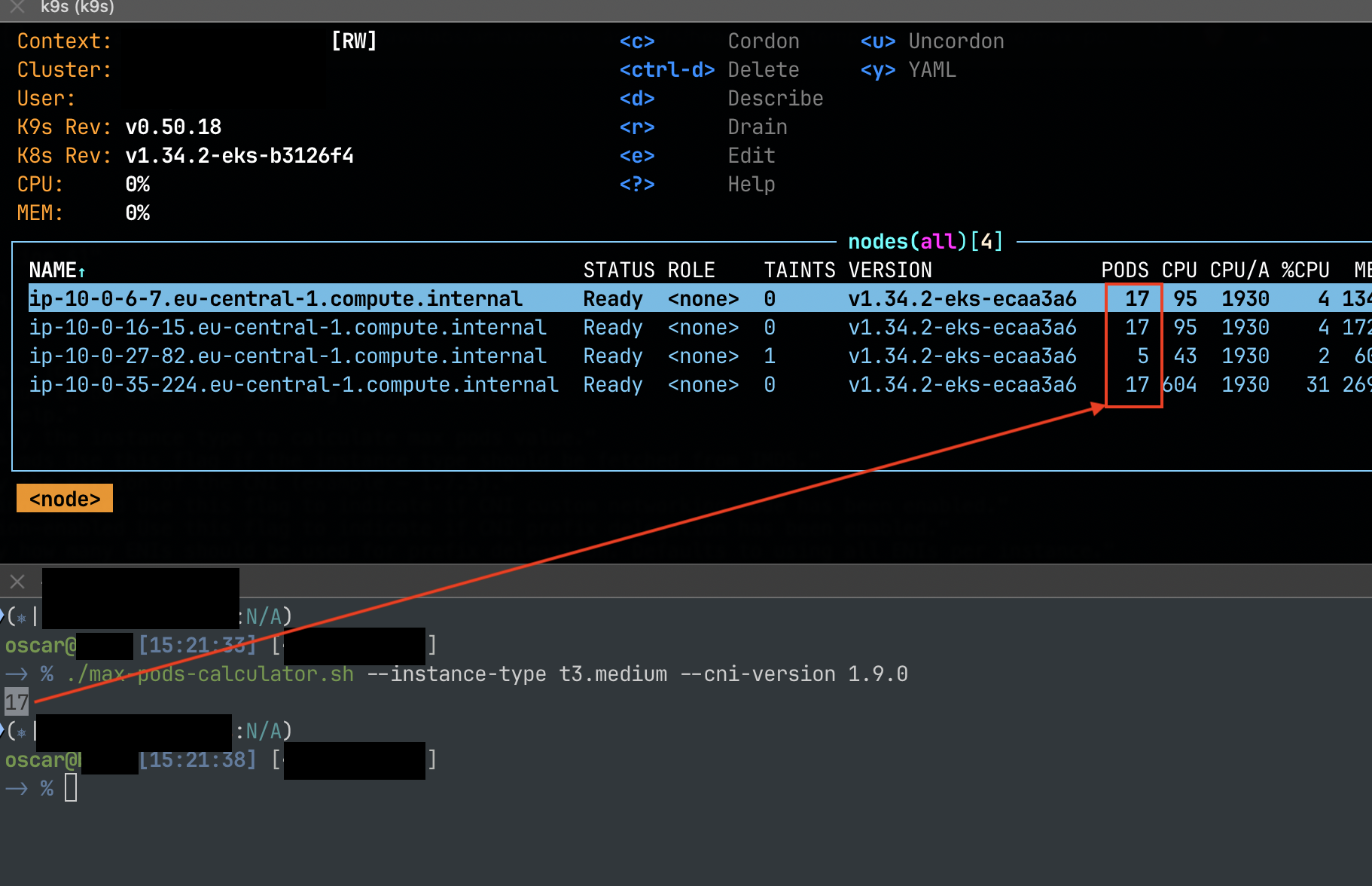
aha !
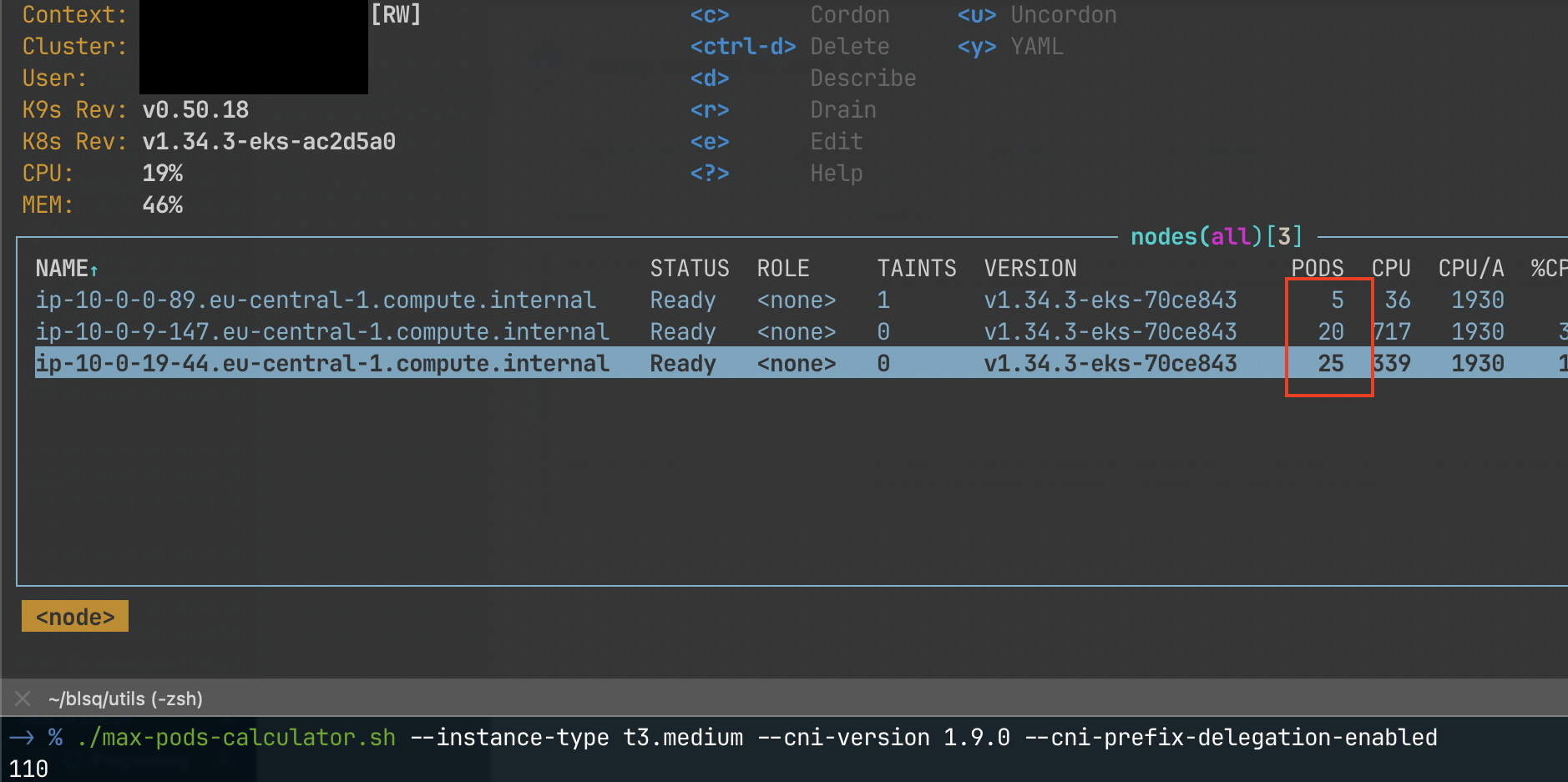
Checking Kubernetes official docs, they say it is designed to allocate *No more than 110 pods per node. Ok fair, but I only got 17 😭
Solution
Enter Prefix Delegation, aka “More Pods per Node”. Here’s the documentation and here’s the blog post
With prefix assignment mode, the maximum number of elastic network interfaces per instance type remains the same, but you can now configure Amazon VPC CNI to assign /28 (16 IP addresses) IPv4 address prefixes, instead of assigning individual IPv4 addresses to network interfaces
More technical explanation here
On the upstream, that is, on the TF module that I am using, the implementation looks like this:
module "eks" {
    source  = "terraform-aws-modules/eks/aws"
    version = "~> 21.0"
    kubernetes_version = "1.34"

    ...
    addons = {
        vpc-cni = {
            before_compute = true
            most_recent    = true
            configuration_values = jsonencode({
                env = {
                ENABLE_PREFIX_DELEGATION = "true" # to increase pods per node
                WARM_PREFIX_TARGET       = "1" # for faster IP allocation in the prefix (faster pod startup)
                }
            })
        }
    }
    ...
}
Once you apply this, make sure it’s present
kubectl describe ds -n kube-system aws-node | grep ENABLE_PREFIX_DELEGATION: -A 3

# ENABLE_PREFIX_DELEGATION:               true # this should be true
Then I made sure to “cycle” my node pools so they are aware of this new confguration.
Finally I went and checked my EKS console (AWS provides a visual dashboard for the Kubernetes cluster)
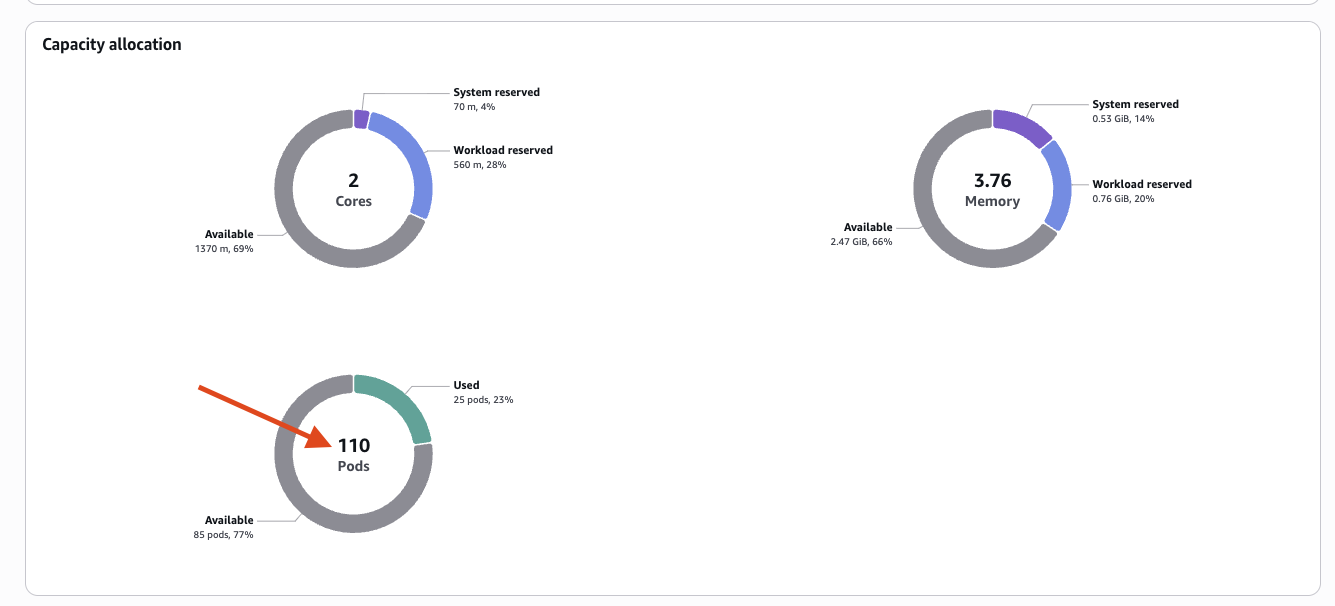
And I can see in my cluster, the descheduler and cluster-autoscaler already did their job, reshuffled and consolidated the pods into 2 instead of 3 nodes.